
Running a small or medium-sized business in Australia means juggling endless financial responsibilities while trying to stay competitive. You’re tracking invoices, managing cash flow, handling GST compliance, and planning for growth - all while your current accounting system struggles to keep up. Simple bookkeeping tools may have worked in your early days, but they weren’t built to handle the complexity that comes with a growing team, multiple departments, and increasing transaction volumes.
The problem compounds as you scale. Manual processes consume valuable time, disconnected systems create data silos, and limited reporting makes it difficult to get the real-time insights you need for smart decisions. Modern accounting platforms designed for growing Australian businesses address these challenges directly - combining comprehensive financial management with intelligent automation, local compliance, and real-time visibility across your entire operation.
The best accounting software for small and medium-sized (SME) Australian businesses combines core accounting with advanced features like multi-entity management, automated workflows, and real-time reporting. Look for platforms that:
- Integrate with Australian banking and accounting systems
- Provide automated GST compliance
- Include automated reconciliation and customisable dashboards
- Scale with your growth - without enterprise-level costs
Modern solutions also incorporate AI-powered automation and expense management capabilities to provide the visibility and control growing businesses need.
What makes accounting software ideal for small and medium-sized businesses
Small or medium-sized businesses occupy an awkward middle ground in the software market. You’ve clearly outgrown entry-level tools like basic bookkeeping apps, but you don’t yet need or want to pay for the complexity and overhead of enterprise-grade ERP systems. What you need is a platform that punches above its weight: one that handles sophisticated workflows, supports a growing team, and provides serious reporting depth without requiring a dedicated IT team to manage it.
The key differentiator for accounting software at this scale is flexibility. As your business evolves, adding departments, opening new locations, or expanding into new markets, your software needs to adapt without requiring a costly migration. Look for platforms that are built to grow with you, not just handle where you are today. The table below outlines the core capabilities that separate purpose-built small and medium business accounting software from tools designed for smaller operations.
| Capability | What to look for |
|---|---|
| User management | Role-based access for 10–50 users with no performance degradation |
| Department tracking | Revenue and expense tracking by department with consolidated reporting |
| Automation | Bank reconciliation, invoice processing, and routine transaction automation |
| Reporting | Customisable dashboards and report builders tailored to your industry |
| Integrations | Seamless connection with CRM, payroll, inventory, and other core tools |
Essential features for growing Australian companies
Not all accounting platforms are created equal when it comes to Australian compliance requirements. Many internationally-focused tools treat GST, BAS reporting, and local payroll obligations as secondary concerns, requiring workarounds or expensive third-party add-ons just to meet basic legal requirements. For Australian small and medium-sized businesses, local compliance needs to be embedded into the platform from the ground up, not bolted on after the fact.
Beyond compliance, Australian businesses also need platforms that work seamlessly with local banking infrastructure. Real-time bank feeds from the major Australian banks are now a baseline expectation, not a premium feature. When evaluating options, the features below should be treated as non-negotiable requirements rather than nice-to-haves - they directly affect how much time your team spends on manual data entry and how confidently you can meet your regulatory obligations.
| Feature | Why it matters |
|---|---|
| GST compliance | Automated BAS prep, GST calculation, and mixed-supply handling |
| Australian bank feeds | Real-time feeds from ANZ, CBA, Westpac, and NAB |
| Multi-currency | Automatic exchange rate updates with AUD consolidation |
| Payroll integration | Super, PAYG, and STP compliance without duplicate data entry |
| AAS compliance | Reporting aligned with Australian Accounting Standards |
To learn more, see our guide on how to compare accounting software for Australian businesses.
Cloud-based advantages and multi-entity management
The shift to cloud-based accounting is no longer a debate for small and medium-sized businesses - it’s a practical necessity. On-premise software creates bottlenecks that actively slow growing teams down: updates require IT involvement, remote access is cumbersome, and scaling up means investing in additional infrastructure. Cloud platforms eliminate these constraints entirely, giving your team secure, real-time access to financial data from anywhere, while your vendor handles the infrastructure, security patches, and backups.
As businesses grow, structural complexity often increases alongside headcount. Many small and medium-sized Australian businesses operate through multiple trading entities, subsidiaries, or franchise arrangements - and managing these through separate systems or manual consolidation processes is both error-prone and time-consuming. Purpose-built multi-entity support removes this friction, allowing you to maintain separate books for each entity while generating consolidated reports across the whole group with a single click.
Why cloud-first makes sense
- Anywhere access - secure access from any device, supporting hybrid and remote work arrangements
- No maintenance overhead - automatic updates, backups, and security patches handled by the vendor
- Pay-per-user pricing - subscription costs scale with your business, not ahead of it
- Real-time collaboration - internal teams and external advisors can work from the same live data simultaneously
Multi-entity capabilities to look for
- Consolidated reporting - combined financial statements across all entities, with separate entity books maintained
- Inter-company transactions - automatic tracking and elimination of inter-entity transactions during consolidation
- Role-based entity access - division managers see only their entity’s data; executives get the full consolidated view
- Currency consolidation - multi-currency entities rolled up cleanly into AUD reporting with proper translation adjustments
To learn more, see our guide on: Cloud accounting software: a complete guide for Australian businesses.
Advanced reporting and business intelligence
The gap between good accounting software and great accounting software often comes down to reporting. Generating accurate financial statements is table stakes; what actually drives better business decisions is the ability to interrogate that data in real time, slice it by department or project, and surface the patterns that aren’t immediately obvious in a standard P&L or balance sheet. For small and medium-sized businesses, this kind of visibility is increasingly the difference between reactive management and proactive strategy.
Advanced reporting tools also reduce the time your finance team spends building reports manually. When dashboards update automatically, exceptions are flagged without anyone having to hunt for them, and forecasting models draw on live transaction data, your team spends less time compiling information and more time acting on it.
| Reporting capability | Business benefit |
|---|---|
| Real-time dashboards | Instant KPI visibility: cash flow, profitability, budget performance |
| Drill-down analysis | Navigate from summary level to individual transactions to investigate variances |
| Predictive analytics | ML-driven forecasting for more accurate budgeting and forward planning |
| Exception reporting | Automated alerts for unusual transactions, policy breaches, or budget overruns |
| Industry metrics | Custom KPIs tailored to your sector: retail, manufacturing, professional services |
Integration capabilities and automated workflows
Your accounting platform should be the financial hub of your business ecosystem - connecting to the tools you already use while automating the processes that slow your team down.
Key integrations
- CRM - combine sales pipeline data with financial performance for complete customer profitability analysis
- Payments and cards - corporate card and bill payment platforms that feed directly into your accounting records
- Inventory - real-time cost of goods sold calculations and accurate stock valuations at all times
- E-commerce - automatic sales sync with GST-compliant revenue recognition across all channels
- Project management - track project profitability and allocate resource costs without manual entries
Workflow automation essentials
- AI invoice processing - automatically extract data from supplier invoices, match to purchase orders, and route for approval
- Multi-level approvals - configurable approval chains by transaction amount, category, or department
- Bank reconciliation - intelligent matching algorithms handle routine transactions, flagging only genuine exceptions for review
- Smart categorisation - machine learning models that improve accuracy over time as they learn from your transaction history
Budget planning and cash flow forecasting
For small and medium-sized businesses, the annual budget process has traditionally been a painful exercise: weeks of spreadsheet consolidation, static assumptions that are out of date by February, and forecasts that offer limited guidance when market conditions change mid-year. Modern accounting platforms replace this model with dynamic, rolling financial planning tools that stay relevant throughout the year and adjust automatically as actual performance data comes in.
Cash flow visibility is particularly critical for growing businesses. Rapid growth often creates cash flow pressure even when profitability is strong - a dynamic that can catch businesses off guard if they’re relying on month-end reporting to spot problems. Advanced forecasting tools use a combination of historical patterns, seasonal trends, and committed future transactions to give finance teams a much clearer picture of where cash will be in the weeks and months ahead, enabling proactive decisions rather than reactive ones.
Planning tools that matter
- Rolling forecasts - dynamic budgets that update continuously based on actual performance data
- Scenario modelling - model the financial impact of expansion plans, new product launches, or significant market changes
- Cash flow prediction - combines historical patterns, seasonal trends, and pending transactions for accurate short-term visibility
- Department-level controls - granular budget management for each team or cost centre via a dedicated budget management platform, with consolidated company-wide visibility for leadership
Expense management and corporate spending control
Traditional expense management - employees paying out of pocket, collecting receipts, submitting paper forms weeks later, and waiting for reimbursement - is inefficient for everyone involved. It creates cash flow pressure for employees, administrative burden for finance teams, and limited visibility for management until it’s too late to influence spending decisions. For small and medium-sized businesses, the volume of transactions makes this problem significantly worse than it is for smaller operations.
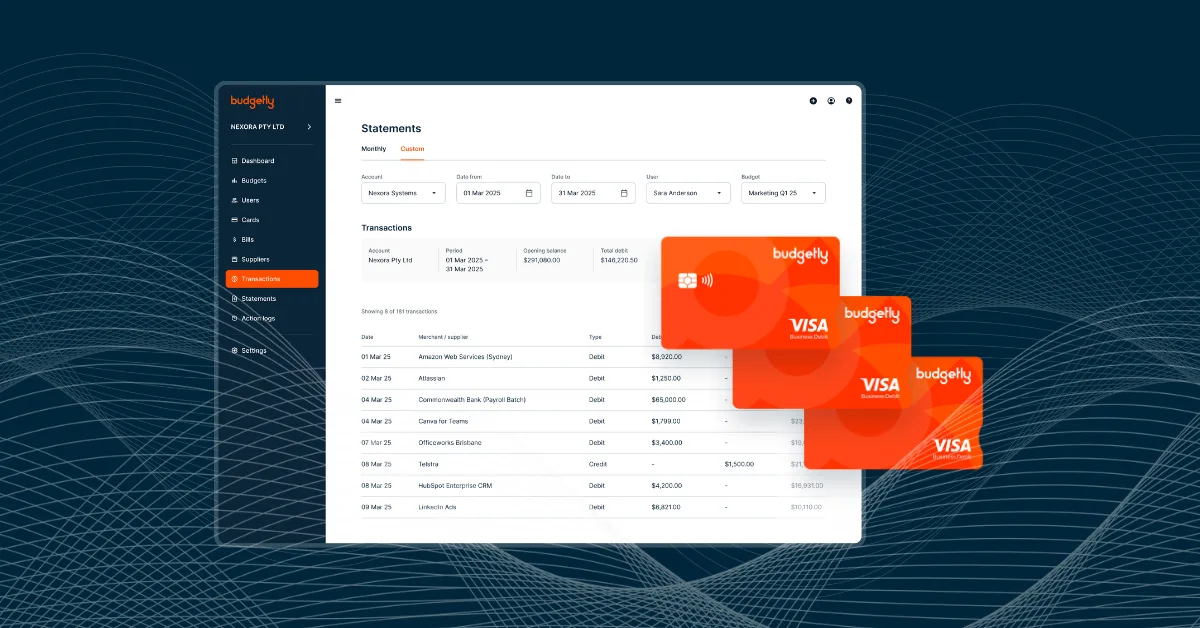
Integrated expense management solves this by connecting spending directly to your accounting platform in real time. When an employee uses a corporate or virtual card, the transaction is captured immediately, categorised automatically, and matched against the relevant budget - giving finance teams the ability to monitor and manage spending as it happens rather than after the fact. This shift from reimbursement-based to card-based expense management also reduces the administrative overhead for employees, improving policy compliance and data accuracy across the board.
Core expense management features
- Virtual cards - create, configure spending limits, and cancel cards instantly for specific team members or purposes.
- Policy-based approvals - automatically route expenses for approval based on amount, category, or department without manual intervention
- Mobile receipt capture - AI-powered scanning extracts transaction data from receipts, eliminating manual data entry in the field
- Spend analytics - identify overspending patterns, negotiate better vendor terms, and enforce policy compliance across the organisation
For further reading, see our guide: The 3 best expense management software options.
Security and compliance
Financial data is among the most sensitive information a business holds, and for small and medium-sized businesses, the consequences of a security breach extend well beyond the immediate disruption. Regulatory penalties, loss of client trust, and the operational cost of recovery can be significant. As your business grows and more users access your accounting platform across more devices and locations, the importance of robust, enterprise-grade security controls only increases.
Australian businesses also face specific compliance obligations that vary by industry and entity structure. Your accounting platform should actively support compliance rather than leaving it entirely to your team to manage. This means built-in frameworks for Australian Accounting Standards, automatic audit trail generation, and clear data governance controls that hold up to scrutiny from external auditors or regulators. When evaluating platforms, treat the following security features as baseline requirements rather than optional extras.
- End-to-end encryption - financial data protected in transit and at rest, with no unencrypted access points
- Multi-factor authentication and role-based access - granular controls ensuring users only see the data relevant to their role
- Comprehensive audit trails - every change to financial records logged automatically with timestamp, user ID, and change detail
- Australian regulatory compliance - built-in support for AAS reporting standards, privacy law, and relevant industry-specific requirements
- Third-party security certifications - ISO 27001 or SOC 2 certification provides independent verification of the vendor’s security practices
Scalability and future-proofing your investment
Selecting accounting software is a significant operational decision, one that affects your team’s daily workflows, your financial data infrastructure, and your ability to report accurately to stakeholders. Making the wrong choice and having to migrate to a new platform two years later is costly in both time and money. The most important thing you can do to avoid that outcome is to evaluate platforms not just against your current needs, but against where your business is likely to be in three to five years.
This means thinking carefully about transaction volume growth, user count increases, potential expansion into new entities or geographies, and the likelihood that your software integration requirements will evolve as you adopt new tools. A platform that performs well today but hits architectural limits at twice your current size is not a scalable solution. The table below outlines the key scalability factors to assess during your evaluation process.
| Scalability factor | What to check |
|---|---|
| User and volume scaling | Handles growth from the current user count and transaction volume without performance degradation |
| Feature expansion | Add-on modules available for inventory, project accounting, and international operations as needed |
| API and integrations | Open, well-documented APIs ensure compatibility with future software acquisitions |
| Vendor stability | Established product roadmap, financial backing, and a track record of long-term customer support |
Implementation, cost, and ROI
Even the best accounting software delivers poor results if the implementation is rushed or poorly planned. For small and medium-sized businesses, the stakes are higher than for smaller operations - you’re migrating more data, training more users, reconfiguring more integrations, and managing more complex workflows. A structured, phased approach to implementation significantly reduces the risk of disruption and ensures your team actually adopts the new platform rather than reverting to old habits.
The business case for switching platforms also needs to be clearly articulated before you commit. Total cost of ownership extends well beyond the monthly subscription fee - implementation services, staff training, integration development, and the productivity dip during transition all need to be factored in. On the other side of the ledger, the gains from automation, improved accuracy, and faster reporting are often larger than businesses initially anticipate. The frameworks below help you structure both the implementation process and the financial case for investment.
A phased implementation approach
- Migrate data - audit and clean existing financial records before import to avoid carrying forward errors or inconsistencies
- Phase the rollout - start with core accounting functions, then layer in expense management, reporting customisation, and integrations
- Train by role - focus on the workflows each user type performs daily, not on system features in the abstract
- Optimise processes - use the implementation as an opportunity to eliminate inefficiencies, not just replicate old workflows in a new system
- Monitor adoption - track usage and error rates in the first few months and address gaps before they become entrenched habits
Calculating ROI
- Time savings - quantify hours saved weekly from automation and multiply by your team’s average hourly cost across the year
- Error reduction - estimate the current cost of manual errors, including correction time, audit adjustments, and any compliance penalties
- Cash flow gains - improved forecasting accuracy and faster receivables processing can meaningfully reduce borrowing requirements
- Avoided upgrade costs - factor in the cost of staying on an underpowered platform, including workarounds, integrations, and lost productivity
Common mistakes to avoid
- Underestimating integration complexity - budget dedicated time and technical resources for connecting to your existing business systems
- Planning only for today - select a platform that handles your likely state in three years, not just your current headcount and transaction volume
- Skipping change management - user adoption doesn’t happen automatically; invest in training and clear communication about why the change is happening
- Insufficient vendor due diligence - check customer reviews, support response times, and the vendor’s financial stability before committing
How Budgetly transforms financial operations for Australian SMEs
Most accounting platforms were built for a world where finance teams spent their days on data entry and manual reconciliation. Budgetly takes a fundamentally different approach - starting from the assumption that routine financial tasks should be handled automatically, so your team can focus on the insights and decisions that actually move the business forward. Built specifically for the Australian market, the platform combines AI-driven automation with deep local compliance knowledge and native integration with the tools Australian businesses already rely on.
Rather than treating expense management as an add-on to core accounting, Budgetly integrates both into a single, unified platform. This means spending data flows directly into your accounting records in real time, budgets are enforced at the point of purchase rather than audited after the fact, and your finance team has a single source of truth for everything from GST reporting to department-level profitability analysis. The table below summarises how each core capability translates into tangible business value.
| Budgetly capability | What it does for your business |
|---|---|
| AI bookkeeping & accounting | Auto-categorises transactions, flags anomalies, and surfaces actionable insights without manual review |
| Xero integration | Native two-way sync keeps your existing Xero workflows intact while adding spend management capabilities |
| Corporate and virtual cards | Granular, real-time spend control with instant card issuance and budget-linked limits |
| Automated expense processing | Receipts captured, categorised, and recorded without manual data entry from your team |
| Australian-first compliance | Built-in GST handling, local bank feeds, and support from a team in your time zone |
Frequently asked questions
What's the difference between small and medium business accounting software?
How long does implementation typically take?
What integrations should I prioritise?
Is mobile access important for small and medium-sized business accounting?
What security features are non-negotiable?
How do I build the business case for new accounting software?
What reporting capabilities matter most for small and medium businesses?
How should we approach user training for new accounting software?
Building a more efficient financial future
The right accounting software does more than keep your books in order; it becomes the operational backbone that gives your finance team clarity, reduces the administrative burden on your broader organisation, and provides the leadership team with the real-time insights needed to make confident decisions. For small and medium-sized Australian businesses, the combination of local compliance requirements, growing operational complexity, and the need to scale efficiently makes platform selection a genuinely consequential choice.
The businesses that build sustainable financial operations are those that invest in integrated platforms rather than trying to patch together disconnected tools. As automation handles more of the routine work, your team’s time and energy can shift toward the analysis and strategic thinking that drives growth. Whether you’re evaluating your first serious accounting platform or reassessing a system you’ve outgrown, the frameworks and considerations in this guide should give you a clear foundation for making the right decision.